
Overview
The EX.CO client delivers a production-ready immersive video experience across mobile and desktop browsers, designed to support contemporary short-form and feed-based video consumption. The client supports both vertical and horizontal video assets and ad formats, mixed sequences within the same feed, while preserving correct rendering and avoiding visual distortion.
Content can be sourced either from EX.CO-managed video feeds or from publisher-managed playlists retrieved via API. In all cases, EX.CO’s OVP acts as the orchestration layer, handling content fetching, prefetching, playback control, monitoring, and monetization execution, while allowing publishers to retain control over playlist composition and ordering when applicable.
Monetization behavior is centrally managed through EX.CO’s OVP and aligned with the Admin configurations, enabling consistent ad delivery, measurement, and policy enforcement across devices and orientations.
A responsive demo client is provided as a reference implementation and validation environment, simulating a real publisher setup and covering key usage patterns such as in-article carousels, full-screen vertical playback, and transitions between viewing modes.
Environments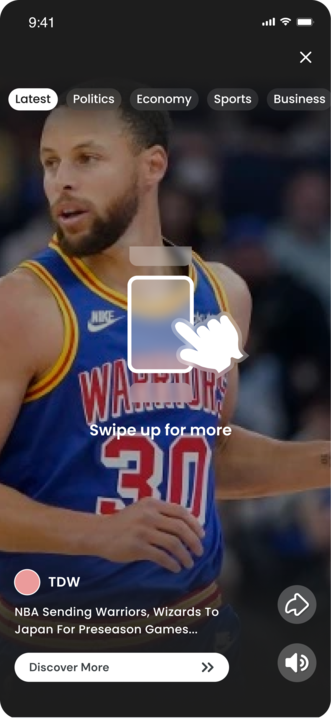
Mobile
The mobile vertical experience is built around familiar social-feed consumption patterns, enabling users to swipe through a continuous stream of short-form video in a full-screen vertical format. The experience is optimized for fast discovery, high engagement, and natural content flow, supporting both vertical and horizontal video and ad formats within the same feed while preserving correct rendering and visual quality.
This model aligns with user expectations shaped by leading social and short-video platforms, delivering an intuitive and immersive viewing experience while allowing centralized control of content sourcing, monetization, and measurement through EX.CO’s OVP.
Desktop
The desktop experience adapts the vertical feed concept to larger screens through a gallery-style interface. The active video is presented prominently, with visual previews of the previous and next assets displayed alongside it, enabling intuitive navigation and continuous viewing.
This approach combines the storytelling strengths of vertical video with desktop browsing behavior, making it suitable for editorial placements, in-article embeds, and dedicated vertical hubs. Mixed orientation content and ads are supported seamlessly, with orchestration, playback, and monetization centrally managed through EX.CO’s OVP.
Embed Implementation
Desktop Gallery View
The Desktop Gallery View brings the high-engagement vertical video feed experience native to mobile social platforms to the desktop environment. This layout features a central vertical player (9:16 aspect ratio) flanked by preview thumbnails of previous and upcoming content in a horizontal carousel structure.
The player logic automatically manages the layout, centering the active video while providing intuitive navigation controls. This creates an immersive, "lightbox-style" overlay experience that captures user focus without navigating away from the underlying page.
Key Benefits
- Modern Content Format: Adapts the popular vertical "story" format for desktop users, increasing familiarity and engagement.
- Content Discovery: The carousel layout visually exposes upcoming content (the "Up Next" card), encouraging users to browse deeper into the playlist.
- Immersive Overlay: By occupying the full viewport of the container, the player minimizes distractions, creating a dedicated viewing environment.
- Visual Agnostic: The player focuses strictly on the content stream, allowing the publisher to control the surrounding "chrome" (background opacity, branding, and close buttons) to match their site identity.
Implementation (Desktop Gallery View)
Overview
The Gallery View is optimized for desktop environments and is designed to occupy the full dimensions of its parent container. This fluid layout allows for versatile integration, supporting both in-article placement and full-screen (100% viewport) experiences.
Player Configuration
The specific Gallery View mode is pre-configured by EX.CO. Publishers do not need to modify the initialization parameters or manually trigger the layout mode via the API. Once the feature is enabled for your Player ID on the EX.CO backend, the player will automatically render with the appropriate gallery behaviors.
Implementation
To implement, embed the player within a dedicated wrapper element. Apply the desired width and height to this parent container, and the gallery will automatically resize to fill the available space. In addition, apply the next CSS rules on the wrapper element, in order to position the Player Gallery correctly:
display: flex;
align-items: center;
justify-content: center;
Implement the standard embed code as usual. The player element must be placed inside the designated parent container.
Visual Customization & Branding
The Gallery View architecture is designed to be visually agnostic, allowing publishers to retain full control over the surrounding aesthetics and branding. Because the player occupies the parent container, visual elements such as backgrounds, navigation controls, and logos can be implemented directly by the publisher within that container context.
As an example, the following elements can be customized via the publisher's CSS and HTML structure:
- Gallery Background: The background color or image should be applied directly to the parent container. The player will render seamlessly over this background.
- Close Functionality: Publishers may implement a custom "Close" button or interaction. This element should be placed within the container structure and positioned using absolute positioning (CSS) to ensure visibility over the player layer.
- Branding (Logos): Publisher logos or watermarks can be overlaid on the gallery by adding the image element to the container and using a higher z-index value to ensure they remain above the video content.
Please note that in Mobile environments, the Desktop gallery view shouldn’t be loaded. The expected approach would be to keep the “player-container” hidden and call the “fullScreen()” method on the player API to open the player in full-screen vertical mode.
Example (Desktop Gallery View)
...
<div
  class="player-container"
  width="1920px"
  height="1080px"
  style="display: flex; justify-content: center; align-items: center;"
>
  <button class="player-close-button">
  <div id="YOUR_PLAYER_ID">
</div>
...
/* Initialize the player as soon as possible, when you have the playlist */
function initPlayer(playlist) {
  return new Promise((resolve) => {
    if (!window.EX.COPlayer) {
      throw new Error('EX.COPlayer is not defined');
    }
    const container = document.querySelector('.player-container');
    if (!container) {
      throw new Error('Player container not found');
    }

    const player = window.EX.COPlayer.connect();
    player.init({
      autoPlay: false,
      content: {
        replacePlaylist: true,
        playFirst: playlist,
      },
    });

    player.on(player.EVENTS.PLAYER_READY, () => {
      player.pause();
      resolve(player);
    });
  });
}
async function showPlayer(index) {
	/* Example of revealing the player in Desktop Gallery mode or mobile
	full-screen in Mobile environment */
	const container = document.querySelector('.player-container');
	if (!container) {
		throw new Error('Player Container not found');
	}

	container.classList.remove('hidden'); //Example: Your mechanism to implement
	hiding and showing the container

	await player.setPlaylistIndex(index);
       player.unmute();
       player.play();

	if (env === 'mobile' /* Example: Your method of determining the environment */)
	{
		player.fullscreen();
player.on(player.EVENTS.EXIT_FULLSCREEN, () => hidePlayer());
	}

	const button = document.querySelector('.player-close-button');
	//Example: Close button implementation to hide the player
	if (!button) {
		throw new Error('Player Close Button not found');
	}

	button.onClick(() => hidePlayer());
}

function hidePlayer() {
	/* Example of hiding the player in Desktop Gallery mode or mobile full-screen
	in Mobile environment */
	const container = document.querySelector('.player-container');
	if (!container) {
		throw new Error('Player Container not found');
	}
	container.classList.add('hidden'); //Example: Your mechanism to implement
	hiding and showing the container
	player.setPlaylistIndex(0)?.then(() => player.pause());
}
Dynamic Playlist Loading (Infinite Feed)
Overview
This implementation creates a seamless, continuous feed experience by dynamically loading batches of content as the user progresses through the playlist. By maintaining a buffer of upcoming content, the player ensures uninterrupted playback without the need for page reloads.
Implementation Logic
The process relies on the publisher's application to manage the playlist's state. The core workflow is as follows:
- Initial Initialization: The player is initialized with a robust starting buffer (minimum of 5 content items).
- Event Monitoring: The application listens for the playlist-index-changed event to track the user's progress.
- Threshold Check: When the user reaches a specific index (e.g., the second-to-last item), the application triggers a fetch for the next batch of content.
-
Injection: The new items are appended to the player queue using the API, ensuring a seamless transition.
Requirements & Best Practices
- Initial Buffer: To prevent buffering gaps, the initial playlist must contain a minimum of 5 items.
- State Management: The logic for determining when to fetch the next batch (the "threshold") and managing the playlist size is handled on the publisher's side, not internally by the player.
Example (Dynamic Playlist Loading):
The following example demonstrates how to initialize the player with a starting batch and listen for index changes to append new content.
async function initInfiniteFeed() {

    // 1. Fetch the initial playlist (Minimum 5 items required)
    const firstChunk = await fetchInitialPlaylist();

    // 2. Connect and Initialize the Player
    const player = ExCoPlayer.connect();

    player.init({
        content: {
            replacePlaylist: true,
            playFirst: firstChunk,
        },
    });

    player.on('player-ready', () => {

        // 3. Listen for playlist progression
        // API Reference: https://developer.ex.co/#/video-channels/api-reference/
        on-method?id=playlist-events
        player.on('playlist-index-changed', async (payload) => {
            const { currentIndex } = payload;

            // 4. Check if we need to load more content
            // 'shouldLoadNextChunk' is a publisher-defined function to check
            buffer size
            if (shouldLoadNextChunk(currentIndex)) {

                const nextChunk = await fetchPlaylistChunk();

                // 5. Append new items to the end of the playlist
                // API Reference: https://developer.ex.co/#/video-channels/
                api-reference/addPlaylistItems-method
                player.addPlaylistItems(nextChunk);
            }
        });
    });
}
Content Specifications
Vertical Content
- Aspect Ratio 9:16
- MP4 or HLS video files supporting a dynamic resolution based on player size.
- Video Title UI
- Upload Time UI
- Closed Captions support
Horizontal Content
- Aspect Ratio 16:9
- MP4 or HLS video files supporting dynamic ratio based on player size.
- Basic video controls support (e.g., play/pause, next/previous, mute/unmute, progress-bar)
- Video Title UI
- Upload Time UI
- Closed Captions support
Demand Specifications
Vertical Ads
- Aspect Ratio 9:16
- Placement or PCLMT (pending the RTB version) - should be =1 - In stream.
- Ad Standards Compliance
- VAST 3.0 / 4.x support
- VPAID (if required by SSP)
- Support for vertical creatives within standard VAST
- Ad Rendering & UX
- Full-screen vertical ad playback
- Proper scaling on mobile and desktop
- Clear CTA, skip button, and ad labels in vertical layout
- Measurement & Tracking
- Standard tracking events: start, quartiles, complete
- Viewability measurement adapted to vertical viewport
- Support for OMID / MRC where applicable
- Autoplay & Sound Behavior
- Autoplay policy (muted / user-initiated)
- Sound on/off signaling to the SSP
- Request to SSP should be sound-on by default.
Horizontal Ads
- Aspect Ratio 16:9
- Ad Standards Compliance
- VAST 3.0 / 4.x support
- VPAID (if required by SSP)
- Support for horizontal creatives within standard VAST
- Ad Rendering & UX
- - Full-screen horizontal ad playback
- - Proper scaling on mobile and desktop
- - Clear CTA, skip button, and ad labels in horizontal layout
- Measurement & Tracking
- Standard tracking events: start, quartiles, complete
- Viewability measurement adapted to vertical viewport
- Support for OMID / MRC where applicable
- Autoplay & Sound Behavior
- Autoplay policy (muted / user-initiated)
- Sound on/off signaling to the SSP
Links
- Demo page - https://demos.ex.co/vertical-feed/